TelcoMgr™

*Special Upgrade Considerations

Hide Navigation Pane

*Special Upgrade Considerations

Previous topic Next topic  

*Special Upgrade Considerations

Previous topic Next topic JavaScript is required for the print function  

Prior to TelcoMgr 6, TelcoMgr stored the NPA-NXX-LINE data and other phone number fields without any formatting, but the user-windows displayed the phone number with the format as ###-###-####. Therefore, the stored data for the displayed phone number 800-675-2415 was actually 8006752415. It was not possible to enter or import another phone number format, for example (800) 675-2415 was not supported.


Starting with TelcoMgr 6 the NPA-NXX-Line [CIR:Line] field was reformatted so telephone numbers may be accepted in various formats, such as +1 (555) ###-#### or (01) ### ######, plus other international number patterns and emerging ISO canonical formats. The canonical address format is a universal phone number format that is both standardized and widely recognized by many different software systems. The format explicitly identifies the components of a phone number and includes Country or Region Code, Area Code and the subscriber number. The canonical format is +Country/RegionCode (AreaCode) SubscriberNumber. For example, this is how you would enter a number for a subscriber in the United States of America in canonical format +1 (425) 555-0100].
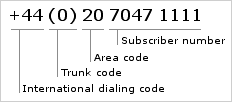
phonenum


If you are upgrading from a previous version of TelcoMgr 6.0, then we recommend the following "Special Upgrade Considerations."


1.Complete and verify a backup of the entire contents of your current live TelcoMgr folder and all sub-folders.
2.Prior to upgrading, read about the What's new in TelcoMgr and become familiar with the features before going live.
3.Consider making a practice upgrade by copying your current live folder to another hard-drive on your server or local computer. Using the practice folder location you can observe the impact of the phone format changes and you can try the Field Data Manager reformatting and mass field update utility that we have included to change your NPA-NXX-Line data back to ###=###-#### or (###) ###-####.
4.Several Field Data Manager (FDM) processes have been automated to format the Circuits:NPA-NXX-LINE field. autoformatphonenumber
5.Two Automated FDM Processes are included with TelcoMgr 6 to restore the formatting of the data in the NPA-NXX-Line field.

autoformatcaution

preservationcopy


6.Also, the Automated FDM Process has an Undo feature, which allows the Format to be applied and then restored if the results are undesirable.

restorephonenumber

7.FDM documentation for formatting your NPA-NXX-Line data to the standard format of ###=###-#### may be view using the following URL: Page url: http://www.telcomgr.com/index.html?expression_for_phone_number_fo.htm , or;
8.Page url: http://www.telcomgr.com/index.html?expression_for_phone_number_f2.htm
9.Were any of your existing CIRCUITS records imported using IMPEX? If yes, you may not able to use the Automated FDM Processes. The FDM process for formatting the [CIR:Line] will only work properly if the field contains numbers only. IMPEX allows the import of CIRCUIT records from EXCEL or CSV type files, which include the "dashed format" or ###-###-####. Therefore, some of your records may be already formatted and if you try to apply a new format to an already correctly formatted phone number, then the results may be undesirable.
10.If you experience a problem with incorrectly formatting any of your phone number fields, please contact ABCI Tech Support:

http://www.abci-software.com/contact/support.htm