Assigning Access Levels

Contents
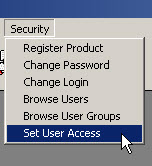
Security Access to the various tables and window forms may be controlled by the TelcoMgr Set Access Rights module, which may be accessed under the Security main menu option.
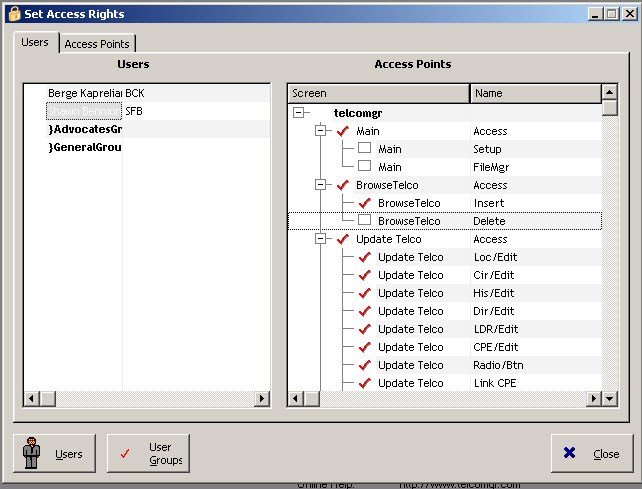
In the image example above the user Shawn Bennion is not a member of a Group and may not access the TelcoMgr Setup and FileManager screens.
Users may be setup as individuals or members of one or more groups. Security Access may be set or controlled at the individual User or Group Level.
Tutorial for Set Access Rights Users and Access Points:
1.Click on an User or Group Name inside the User table and the User/Group's privileges are show in the Access Point table-tree on the right-hand side of the window as shown above.
2.Click on the [check box] to modify the User/Group's setting. The red check indicates that the privilege is granted and the empty box indicates the privilege is denied.
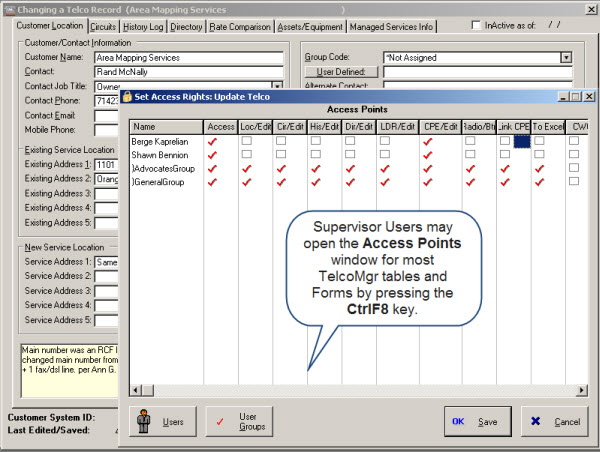
Alternately, Security Privileges may be set or altered by a Supervisor user by using the CTRL-F8 key. When logged in as Supervisor, you must go into every screen and press CTRL-F8. This will bring up the Set User Access screen. You will see a list of your User & Groups, and a list of protected controls that are initially all set for access. Double-clicking on a red check or empty box will cause it to toggle. For each user group, turn off the controls you do not want that user group to have access to in the current screen.
USER TIP: If you give a user ALL ACCESS in the [Default Access] field then you must manually reset the controls that you wish to restrict in each module or TelcoMgr screen. Conversely, if you set the field to NO ACCESS you must manually reset the controls that you wish to enable for the user or group.